
Module examples – WP/ Divi general
alphabetical order, comments in pink
Accordion title
Accordion content
more accordion content
Your Title Goes Here - what is the difference in this and other accordion title?
Your content goes here. Edit or remove this text inline or in the module Content settings. You can also style every aspect of this content in the module Design settings and even apply custom CSS to this text in the module Advanced settings.
Accordion title
Accordion content
more accordion content
Your Title Goes Here - what is the difference in this and other accordion title?
Your content goes here. Edit or remove this text inline or in the module Content settings. You can also style every aspect of this content in the module Design settings and even apply custom CSS to this text in the module Advanced settings.
Call to action example - title
Call to action example – body [backround colour = default]
%
Circle counter example
Above ‘Comment’ option. Can’t see how you give people a button to click to leave comment.
Contact form example - title
Above = Supreme embed google map settings

Blurb module - title example
Blurb content example [image appears by default but can be deleted]
Whole box clickable
Blurb module - title example
Blurb content example [image appears by default but can be deleted]
- bar counter example 50%
Above = Divider line module example
Heading module example - defaults to H1
Above = icon example (Christmas sleigh). there are lots of examples, this was default size and layout
Above = image example, default size and layout

photoholgic-Q9H0WK0LP7w-unsplash

daniel-sessler-wOjW_PVsiAE-unsplash-1

andreas-m-MfBRRdNAyhQ-unsplash

shutterstock_662171107

shutterstock_1714914373-2
(Above = Gallery example. Defaults to 4 (fills screen width, I changed it to 3). Doesn’t show where the text is from/ how to edit.
There is a ‘Map’ module but it says the Google API is disabled in Theme settings.
%
number counter example - title
![Person module example - Name [NB wouldn't use this format]](data:image/svg+xml;base64,PHN2ZyB3aWR0aD0iNTAwIiBoZWlnaHQ9IjUwMCIgdmlld0JveD0iMCAwIDUwMCA1MDAiIHhtbG5zPSJodHRwOi8vd3d3LnczLm9yZy8yMDAwL3N2ZyI+CiAgICA8ZyBmaWxsPSJub25lIiBmaWxsLXJ1bGU9ImV2ZW5vZGQiPgogICAgICAgIDxwYXRoIGZpbGw9IiNFQkVCRUIiIGQ9Ik0wIDBoNTAwdjUwMEgweiIvPgogICAgICAgIDxyZWN0IGZpbGwtb3BhY2l0eT0iLjEiIGZpbGw9IiMwMDAiIHg9IjY4IiB5PSIzMDUiIHdpZHRoPSIzNjQiIGhlaWdodD0iNTY4IiByeD0iMTgyIi8+CiAgICAgICAgPGNpcmNsZSBmaWxsLW9wYWNpdHk9Ii4xIiBmaWxsPSIjMDAwIiBjeD0iMjQ5IiBjeT0iMTcyIiByPSIxMDAiLz4KICAgIDwvZz4KPC9zdmc+Cg==)
Person module example - Name [NB wouldn't use this format]
Person module example - Position
Person module example – body
Post navigation example
Draft – module examples (divi WP)
Post/ blog title example – default setting, can switch off name, date etc
Pricing Table Title example
Pricing Table sub-Title example- Body example
- This feature is included
- This feature is included
- This feature is included
- This feature is not included
- This feature is not included
Table Title
Subtitle goes Here- This feature is included
- This feature is included
- This feature is included
- This feature is included
- This feature is not included
- This feature is not included
Above = social media follow example
Tab example – body 1
Tab body 2
Testimonial example – body. Blah blah
Text example – body
Toggle example - Title (can close when opened, unlike accordion)
Toggle example – body
body…..
Toggle example - Title (how different to accordion?)
Toggle example – body
body…..
Above = video example
Below – examples from Library (can’t see name click settings)
Library module/ underlined heading
Centred header (no underline)
Centre text (for intros)
space holder
Underlined H2 header
Underlined H2 header
Everything we do is evidence-based
number counter example
Lorem ipsum dolor sit amet consectetuer adipiscing elit sed diam nonummy nibh euismod tincidunt ut laoreet.
Lorem ipsum dolor
sit amet consectetuer adipiscing elit sed diam nonummy nibh euismod tincidunt ut laoreet.
Lorem ipsum dolor sit amet consectetuer adipiscing elit sed diam nonummy nibh euismod tincidunt ut laoreet.
Lorem ipsum dolor sit amet consectetuer adipiscing elit sed diam nonummy nibh euismod tincidunt ut laoreet.

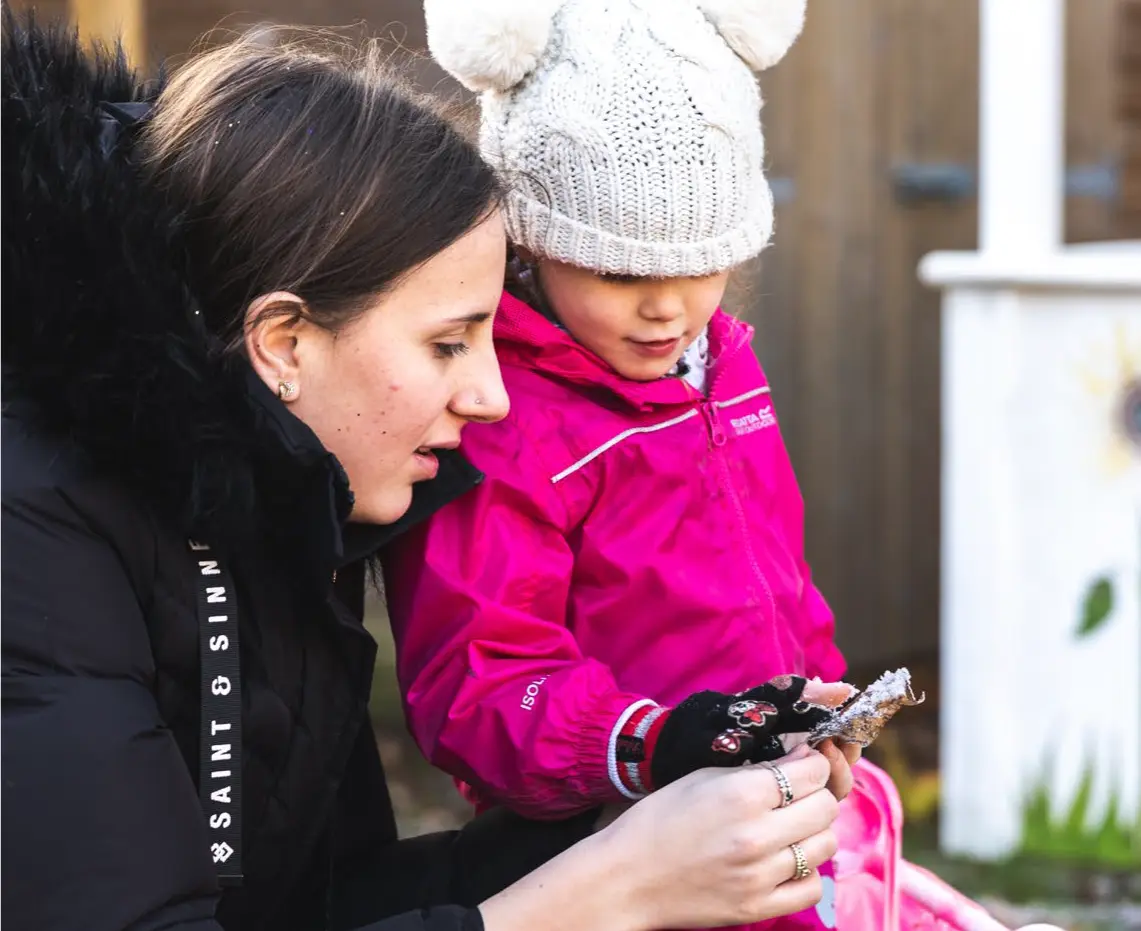
Lindsey Hart - Manager
Lindsey has been the manager of Little Peeple Nursery since it opened. She is an experienced NNEB and has set up and managed day nurseries at the local school and FE college, where she also lectured in Childcare and Education.
Name - role
I mainly work in the Oak room. I love playing outdoors with the children, summer or winter – we grew some amazing pumpkins in our nursery veg plot last year.
Name and role
Brief description
Session times
Families can opt for a variety of sessions…
Morning session
Wraparound Breakfast
8 – 8.30am
Funded morning session
8.30 – 11.30am
Wrap around Lunch session
11.30 – 1.230pm
Who is the training for?
Lorem ipsum dolor sit amet, consectetuer adipiscing elit, sed diam nonummy nibh euismod tincidunt ut laoreet dolore magna aliquam erat volutpat. Ut wisi enim ad minim veniam, quis nostrud exerci tation ullamcorper suscipit lobortis nisl.


Training courses
Lorem ipsum dolor sit amet, consectetuer adipiscing elit, sed diam nonummy nibh euismod tincidunt ut laoreet dolore magna aliquam erat volutpat. Ut wisi enim ad minim veniam, quis nostrud exerci tation ullamcorper suscipit lobortis nisl ut aliquip ex ea commodo consequat.
In-house training
Lorem ipsum dolor sit amet, consectetuer adipiscing elit, sed diam nonummy nibh euismod tincidunt ut laoreet dolore magna aliquam erat volutpat. Ut wisi enim ad minim veniam, quis nostrud exerci tation ullamcorper suscipit lobortis nisl ut aliquip ex ea commodo consequat.

In-house training
Lorem ipsum dolor sit amet, consectetuer adipiscing elit, sed diam nonummy nibh euismod tincidunt ut laoreet dolore magna aliquam erat volutpat. Ut wisi enim ad minim veniam, quis nostrud exerci tation ullamcorper suscipit lobortis nisl ut aliquip ex ea commodo consequat.

Who can deliver Peep Programmes and training?
Lorem ipsum dolor sit amet, consectetuer adipiscing elit, sed diam nonummy nibh euismod tincidunt ut laoreet dolore magna aliquam erat volutpat. Ut wisi enim ad minim veniam, quis nostrud exerci tation ullamcorper suscipit lobortis nisl ut aliquip ex ea commodo consequat.
How to secure funding for Peep training
Lorem ipsum dolor sit amet, consectetuer adipiscing elit, sed diam nonummy nibh euismod tincidunt ut laoreet dolore magna aliquam erat volutpat. Ut wisi enim ad minim veniam, quis nostrud exerci tation ullamcorper suscipit lobortis nisl ut aliquip ex ea commodo consequat.

What is Peep?
Lorem ipsum dolor sit amet, consectetuer adipiscing elit, sed diam nonummy nibh euismod tincidunt ut laoreet dolore magna aliquam erat volutpat. Ut wisi enim ad minim veniam, quis nostrud exerci tation ullamcorper suscipit lobortis nisl ut aliquip ex ea commodo consequat.
Lorem ipsum dolor sit amet, consectetuer adipiscing elit, sed diam nonummy nibh euismod tincidunt ut laoreet dolore magna aliquam erat volutpat. Ut wisi enim ad minim veniam.
Want to know more?
Lorem ipsum dolor sit amet, consectetuer adipiscing elit, sed diam nonummy nibh euismod tincidunt ut laoreet dolore magna aliquam erat volutpat. Ut wisi enim ad minim veniam, quis nostrud exerci tation ullamcorper suscipit lobortis nisl ut aliquip ex ea commodo consequat.
News
Narrowing the attainment gap – Peep Learning Together Study update
Further analysis has shown that the Peep Learning Together Programme made the greatest difference to children eligible for Early Years Pupil Premium Read more

3 key messages from new Sure Start research
As the IES research into Sure Starts found, early intervention can be cost-effective and make a real, positive difference to narrowing the gap in children's outcomes. Here are 3 key take-aways for organisations using Peep Programmes Read more
Supporting the Peep Progression Pathway
From Children's Centre teacher to Qualifications Manager, Debbie shares how the Peep Progression Pathway supports parents' learning and confidence. Read more
0 Comments